New iOS v1.13 is now available

Never want to
your lists again?

A voice-first shopping list, refined over fourteen years. Speak items, sync with family in real time, check things off at the store. Works offline. Used by millions of people worldwide.
★★★★★ 4.7 average · 148,000 reviews · 5M downloads
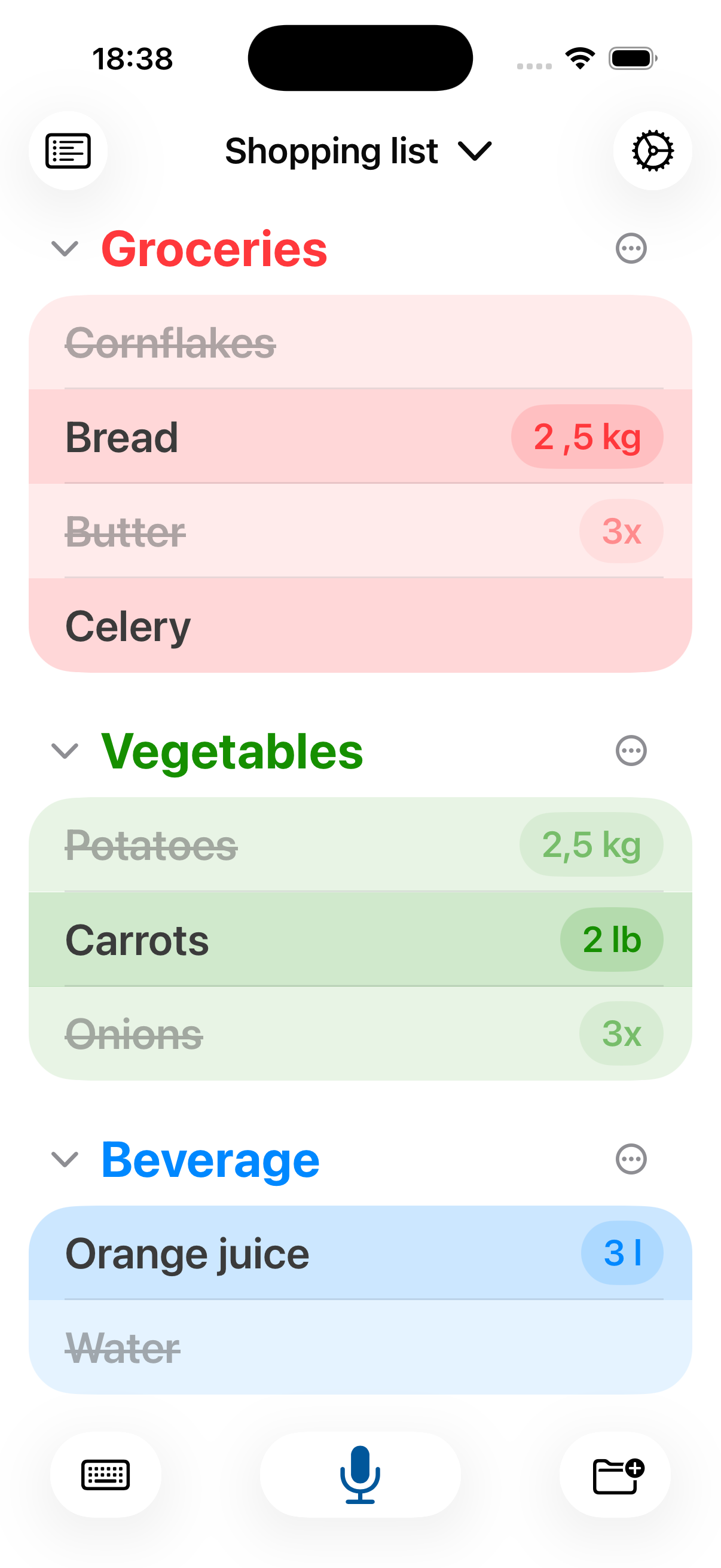
Shopping App on a phone
5M
Installs
110K
5-star ratings
40M
Syncs / day
14y
In production

Built for how you actually shop.

Many features, refined over fourteen years of release notes.

Voice input

Tap the mic and speak. The app parses items into your list — categorized if you've enabled it.

Real-time sync

Lists update across devices the moment they change.

Configurable

Colors, gestures, sort order, swipe behavior. Every interaction is adjustable in settings.

Categories

Group items by store aisle. Collapse, reorder, color-code. Match your shopping route.

Import

Simple import from any website and any recipe.

History

The items you purchase frequently are saved and can be easily retrieved at any time. The mundane gets one tap away.

A closer look.

Screenshots from the current build. Choose your platform below.

Latest releases.

Version notes, beta announcements, and engineering posts. No marketing fluff.

2026.05.16

Looking for beta testers

Help me shape the next releases — free early access, direct feedback line, no formal report needed.

Read notes →
2026.05.12

A new Website

Out with the old WordPress install, in with a clean, fast, static site built from scratch.

Read notes →
2026.02.27

Shopping App lands on iOS

Twelve years after the first Android version, the iOS port goes live. Feature-parity, cross-platform sync, same encrypted backend.

Read notes →

Answers, direct.

Search the documentation, or filter by category. Still stuck? Email support@shopping-app.net.

Create an account on your first device, log in on the next, and your lists stay mirrored in real time. Everything is encrypted in transit and at rest. We can't read your lists — and if you forget your password, only you can reset it via email.
Yes. Open any list, tap the share icon, and enter the email of the person you want to share with. They'll receive an invite. Up to six members per shared list. Works cross-platform between Android and iOS.
On the login screen, tap "Forgot password" and enter your email. You'll receive a reset link within a few minutes. Check your spam folder if it doesn't arrive within 10 minutes.
In the free app: Settings → Backup → Export. Then open Pro and Settings → Backup → Import. Verify everything came across, then you can safely remove the free version.
No. Purchases are tied to your Google or Apple account. Sign in with the same account, open your library or purchase history, and reinstall Pro for free.
Free covers the core experience: lists, voice input, single-device use. Pro adds unlimited list sharing, recipe import, custom categories with colors, widget customization, and removes the ad banner.
On Android: make sure Google is set as the default voice recognizer (Android Settings → Language & Input), then in the app: Settings → Speech recognition → Enable system default voice input. On iOS: ensure dictation permission is granted in iOS Settings → Privacy.
Voice input uses your device's native speech engine, so it supports every language your Android or iOS device supports — 50+ languages including German, English, Spanish, French, Italian, and most major Asian languages.
Almost always: the "keep display on" setting. Go to Menu → Settings → Display and uncheck "Display stays active while app is running." Battery use returns to normal immediately.
First: force-quit and reopen. If that fails: Android → Settings → Apps → Shopping App → Storage → Clear cache (not data). iOS → delete and reinstall, then sign in to restore your lists. If it persists, email support with your device model and OS version.
Account email and an anonymous device ID for sync. List contents are end-to-end encrypted and unreadable by us. No tracking, no analytics SDKs, no third-party ad networks. Full details in the Privacy Policy.
In-app: Settings → Account → Delete account. This wipes all your encrypted list data from our servers within 72 hours and cannot be undone. You can also email support@shopping-app.net with your account email to request deletion.

Get in touch.

Bug reports, feature requests, general questions. Replies are personal, not templated.

email → support@shopping-app.net
 
android sync → operational
ios sync → operational
authentication → operational